


Blog

AUTO DIALER SOFTWARE FOR CALL CENTERS
Call centers get a lot of calls every day. Calls to leads, talking to customers, following up on requests, sending reminders and making support calls are among the duties of agents. When agents dial every number by hand, they waste a lot of time on simple things.
This is where auto dialer software comes in. Auto dialer can dial numbers from a list and transfer answered calls to the appropriate agent or call flow. It allows teams to manage calls easily and planned.
Callcentersolution.in Call center and telecom solutions for businesses that need dependable tools
for voice calls, IVR, cloud calling and dialer software are provided by in.
What Is an Auto Dialer?
An auto dialer software that makes outbound calls from a list of phone numbers. It reduces the need for agents to dial each number one by one.
The system can help with tasks such as:
- Dialing numbers
- Managing call lists
- Sending calls to agents
- Tracking call results
- Recording calls
- Managing campaigns
- Working with IVR
- Creating call reports
The setup can be changed based on the needs of the call center. For a small team, a simple dialer may be enough. A large team may need more control, reports, IVR, CRM links, and cloud support.
Why Do Call Centers Need a Dialer?
Making calls by hand might be sluggish. Finding a number, calling it, waiting for a response, and noting the outcome could take time for an agent. When a team has hundreds or thousands of contacts, that time adds up.
The system handles the dialing process with automatic dialing.
Then, agents can engage with people for longer periods of time. This does not imply that all calls ought to be made entirely automatically. The type of business, the call procedure, and the method of customer communication all influence the proper configuration.
Main Benefits of Auto Dialer Software
Save Agent Time
Agents do not have to dial every number by hand. The software handles the dialing process and helps agents focus on calls. This can make the daily work easier and more organized.Handle More Calls
A call center may have a large contact list. An auto call dialer can help teams work through the list in a planned way. The goal is better use of agent time, not simply making more calls.Keep Calls Organized
Call lists can be divided by campaign, team, customer type, or business need. For example, a company can keep separate lists for:- New leads
- Old leads
- Customer follow-ups
- Payment reminders
- Surveys
- Service calls
Track Call Results
Good Dialer software gives managers useful call data.Reports may show:
- Calls made
- Calls answered
- Missed calls
- Call time
- Agent activity
- Call results
- Campaign progress
Support Agents
The dialer can connect a call to an available agent. This can reduce the time an agent spends waiting between tasks. When the system is linked with other tools, agents may also be able to see customer details while handling a call.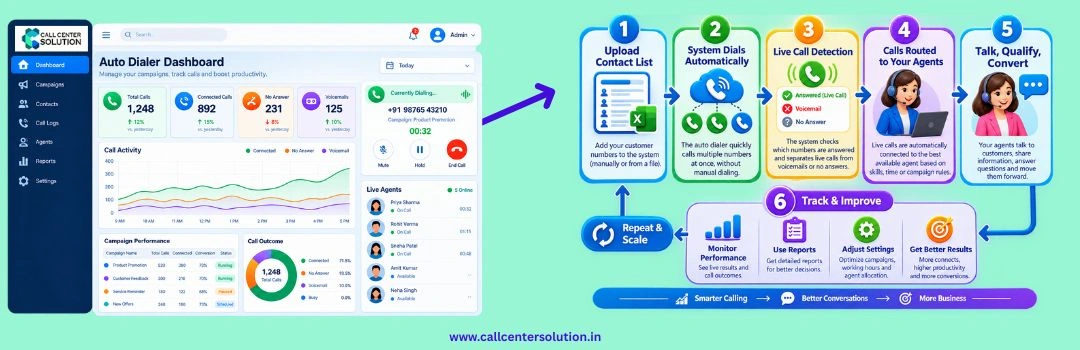
How an Automatic Call System Works
The process is pretty easy.A company starts by adding a list of customers or leads to the system. After that, the setup is chosen, and the automatic call system starts calling numbers.When someone answers the phone, it can be sent to a person who is free or to a different call flow.
It is possible to record what happens if a call is not answered. Based on its own calling process, the team can then decide what to do next.
A typical process may look like this:
Contact List → Auto Dialer → Call → Agent or IVR → Call Result → Report
This simple flow can help a call center keep its outbound work under control.
Where Can Auto Dialer Software Be Used?
An auto dialer is useful in many industries.Sales Teams
Sales teams can use an auto dialer to contact leads and follow up with people who have shown interest in a product or service. Instead of spending time on manual dialing, sales staff can focus on the conversation.BPO and Call Centers
BPO teams often manage different campaigns for different clients. Auto dialer software can help them manage lists, agents, and call data from one system.Banks and NBFCs
Financial companies may need to make customer calls for reminders, service follow-ups, and other approved communication. A dialer can help organize these calls and track their results.Healthcare
Hospitals and clinics can use calling systems for appointment reminders, follow-ups, and patient communication. An automatic call can also be part of an IVR-based process where suitable.E-commerce
Online businesses may need to contact customers about orders, delivery issues, service requests, and feedback. A dialer can help the team manage these calls in a structured way.
Auto Dialer and IVR
You can combine an auto-dialer and an IVR solution to build a larger call system.IVR allows people to press buttons on their phone or talk their way through a menu. Dialers allow a business to create multiple call flows for different needs.A company might use the scheduler to make an outgoing call and then the IVR to give the customer basic information or connect them with the right team. This can cut down on manual work and keep the flow of calls clear
Auto Dialer and CRM
Many companies already use a CRM to keep track of their customer information. It can be easier to do the work if you connect the dialer to a CRM. The worker can see information about the customer while the call is going on, and the call results can be saved for later use.This makes it easier for the sales and support teams to see what customers are doing. Businesses should make sure that the dialer works with the CRM and other tools they already use before they choose a system.
What to Check Before Buying Dialer Software
Choosing the right dialer software is important. A system that works well for one company may not be right for another.Here are some points to check.
Call Volume
Look at the number of agents, calls, and campaigns your team handles each day.
Ease of Use
Agents and managers should be able to use the system without a complex setup.
Reports
Check whether the system provides the reports your managers need.
IVR Support
If your business uses IVR, make sure the dialer can work with your IVR setup.
Cloud Support
Cloud calling can be useful for businesses with teams working from different locations.
Support
Technical support is important when the system is part of daily call operations. Choose a provider that understands telecom and call center needs.
Agents and managers should be able to use the system without a complex setup.
Reports Check whether the system provides the reports your managers need.
IVR Support
If your business uses IVR, make sure the dialer can work with your IVR setup.
Cloud Support
Cloud calling can be useful for businesses with teams working from different locations.
Support
Technical support is important when the system is part of daily call operations. Choose a provider that understands telecom and call center needs.
Cloud calling can be useful for businesses with teams working from different locations.
Support
Technical support is important when the system is part of daily call operations. Choose a provider that understands telecom and call center needs.
Why Work With Callcentersolution.in?
Callcentersolution.in is a Indian company working in telecom and call center technology. The company also provides call center software, dialer software, IVR and cloud call center services.For businesses, its main goal is to help them pick and use communication tools that work best for them. You should choose a dialer just because it has a lot of options. Which option is best relies on how many agents are needed, how many calls come in, what kind of calls they are, the current systems in place, and plans for the future. Call center solution. in has experience with both telecom and call center solutions, so it can help businesses figure out what they need and pick the right setting.

A Better Way to Manage Outbound Calls
People still need to be called for sales, service, support, and business growth. But dialing by hand can take a lot of time during the day. A machine that makes calls automatically can do the calling while agents talk to people.Automatic dialing can be a whole part of a call center setup if it includes call reports, IVR, CRM support and campaign tools. It's not always true that the system with the most functions is the best.
The one that works best for your business, your team, and the way you handle calls.If you want to add an auto-dialer or make your current call center better, talk to Callcentersolution in about your needs, and they will help you find a good solution
Read Also: Is an Auto Dialer Worth It for Five Persons Sales Team?
Latest Blog Posts
Auto Dialer Software for Call Centers
Call centers get a lot of calls every day. Calls to leads, talking to customers, following up on req
Is an Auto Dialer Worth It for a 5-Person Sales Team?
An Auto Dialer could seem like a clear purchase for a big call center. However, what about a five-pe
Interactive Voice Response (IVR) System
A basic IT device the changes way business engage to users is an Interactive Voice Response (IVR) sy